Kubernetes
Prerequisites: HTTP & TCP, Load Balancing
← Cloud | Next: Observability →
Why This Exists
Your Deployment says 3/3 Ready. Grafana is green. Users get 504.
Kubernetes did not "lose the request." The request walked Client → Ingress → Service → Endpoints → Pod and fell off at a hop you did not look at. The most expensive K8s skill is not writing YAML — it is knowing which object is lying and which kubectl command makes it confess.
This page is a field guide: the objects, the path, the probes, then a diagnosis playbook for the failures that actually page you.
Mental Model
A Pod is a rented room (one or more containers, one network namespace, one IP). A Deployment is the hotel manager that keeps N rooms occupied. A Service is the front-desk phone number (stable virtual IP) — it does not run your app. Endpoints / EndpointSlice is the current list of room numbers that are Ready. Ingress is the street address and the bouncer (HTTP routing / TLS). If the phone list is empty, calling the front desk fails even if rooms exist.
Abstraction Levels
A Deployment keeps N pods running; a Service gives them a stable address; Ingress routes external HTTP to that Service; probes decide whether a pod counts as "ready" to receive traffic at all.
"Kubernetes handles scheduling, self-healing, and rolling updates — set requests/limits and readiness/liveness probes and it manages the rest." True as far as it goes, and enough for most interview answers.
"3/3 Ready" in the Deployment can coexist with zero working requests — the failure is usually in a hop the Deployment status doesn't cover: a Service with no matching Endpoints (label selector typo), a readiness probe that passes before the app can actually serve, or a liveness probe that hits a slow dependency and kills healthy pods under load. kubectl diagnosis means walking Client → Ingress → Service → Endpoints → Pod and checking each hop individually, not trusting the top-level status.
Kubernetes' self-healing assumes failures are legible to it — a crashed process, a failed probe. It does nothing for a pod that's alive, ready, and silently returning wrong answers (a logic bug, a bad config rollout, a corrupted cache) — that's an application-observability problem, not something the scheduler or probes can catch.
The Objects That Matter
| Object | What it actually is | Common lie |
|---|---|---|
| Pod | Smallest deployable; IP + volumes + containers | Running ≠ serving traffic |
| Deployment / ReplicaSet | Desired replica count + rolling update | Available can be true while the new RS is broken if you mis-set maxUnavailable |
| Service | Virtual IP + iptables/IPVS / kube-proxy rules | Exists even with zero endpoints |
| EndpointSlice | Ready pod IPs for that selector | Empty when readiness fails or selector is wrong |
| Ingress | L7 route to a Service | 404 from the controller is not your app 404 |
| Probe | kubelet asking the container a question | Liveness that hits the DB suicides the fleet |
Requests / limits (the other page-causer):
- request — scheduler + bin-packing. Too low: noisy neighbor. Too high: Pending forever.
- limit — cgroup cap. CPU limit → throttle (latency). Memory limit → OOMKilled (restart).
- Unset limit: the node OOM killer picks a victim (maybe not you). Unset request: you are scheduled as if you were tiny.
Service Types
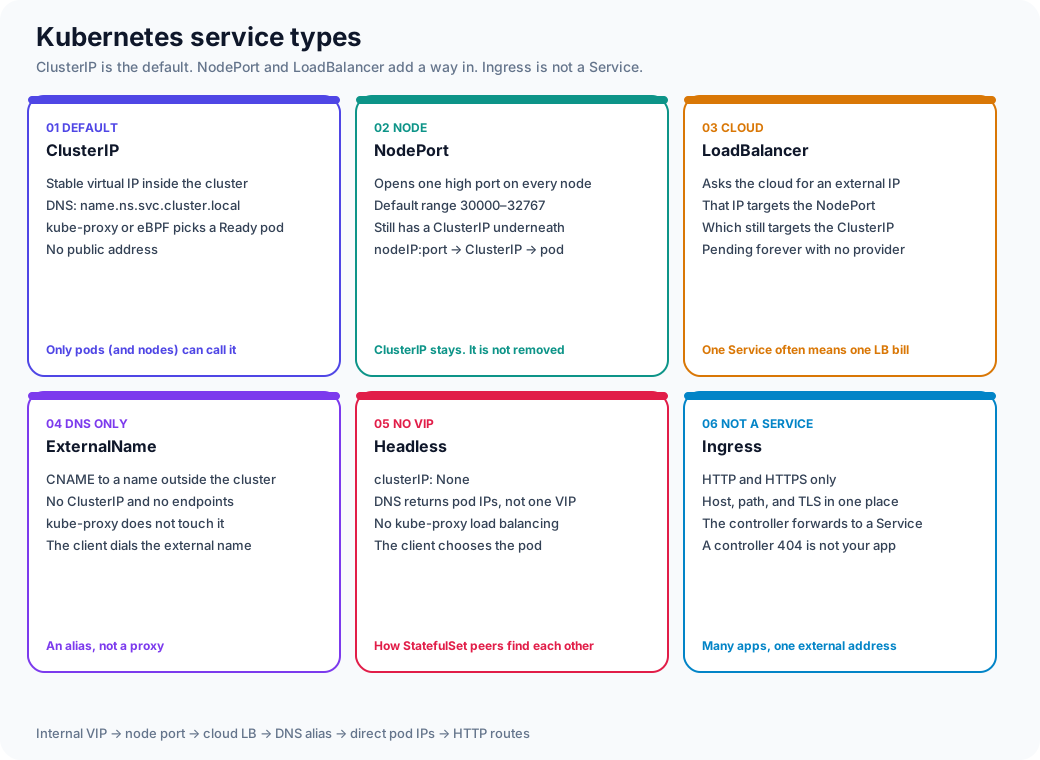
A Service is a stable name and, usually, a virtual IP. The type field changes who can open that name. It does not run the container.
| Type | What you actually get | Who can call it | The mistake |
|---|---|---|---|
| ClusterIP | VIP + DNS name.ns.svc.cluster.local | Pods in the cluster (and the nodes) | Treating it as a public address |
| NodePort | That ClusterIP, plus one high port on every node | nodeIP:30000–32767, and still the ClusterIP | "NodePort means there is no ClusterIP" |
| LoadBalancer | ClusterIP + NodePort + an external IP from the cloud | The cloud IP, from outside | One Service per microservice, and a load-balancer bill for each |
| ExternalName | A CNAME. No VIP, no endpoints, no kube-proxy | Whoever resolves the Service name | Expecting the cluster to proxy the bytes |
| Headless | clusterIP: None. DNS returns pod IPs | Clients that want to pick a pod | Thinking "headless" means "no DNS" |
Headless with a selector publishes each Ready pod as an address (db-0.db.ns.svc.cluster.local on a StatefulSet). Headless without a selector is how you attach your own Endpoints to an IP that lives outside the cluster. Neither case is load-balanced by kube-proxy. The client, or a StatefulSet peer, chooses.
LoadBalancer with no cloud controller stays <pending>. The ClusterIP still works from inside the cluster. The default NodePort range is 30000–32767 (--service-node-port-range). Do not memorize a port from a diagram onto a cluster that changed the range.
Ingress is the HTTP front door: host, path, TLS, then a Service name. A 404 from the controller never reached your process. Gateway API is the newer object with the same job; the hop you debug is still "which Service did this route name?"
Request Flow
flowchart LR
    U[Client] --> I[Ingress controller]
    I --> S[Service ClusterIP]
    S --> E[EndpointSlice]
    E --> P1[Pod A Ready]
    E --> P2[Pod B Ready]
    P3[Pod C Running unready] -.-> E
    style P3 fill:#e65100,color:#fff
style E fill:#1565c0,color:#fff- DNS:
api.shop.com→ Ingress controller (or external LB). - Ingress matches host/path → Service name (not a pod).
- kube-proxy (or dataplane: Cilium, Istio) NATs ClusterIP to a Ready endpoint.
- Pod network: container port. App accepts.
If Endpoints is empty, the Service still has an IP. Packets go to a black hole or the LB returns 503. kubectl get pods can look perfect.
Interactive Simulation
Try: Fail readiness, then Send request. The pod is still "there." The Service will not send it work.
How the packet actually moves
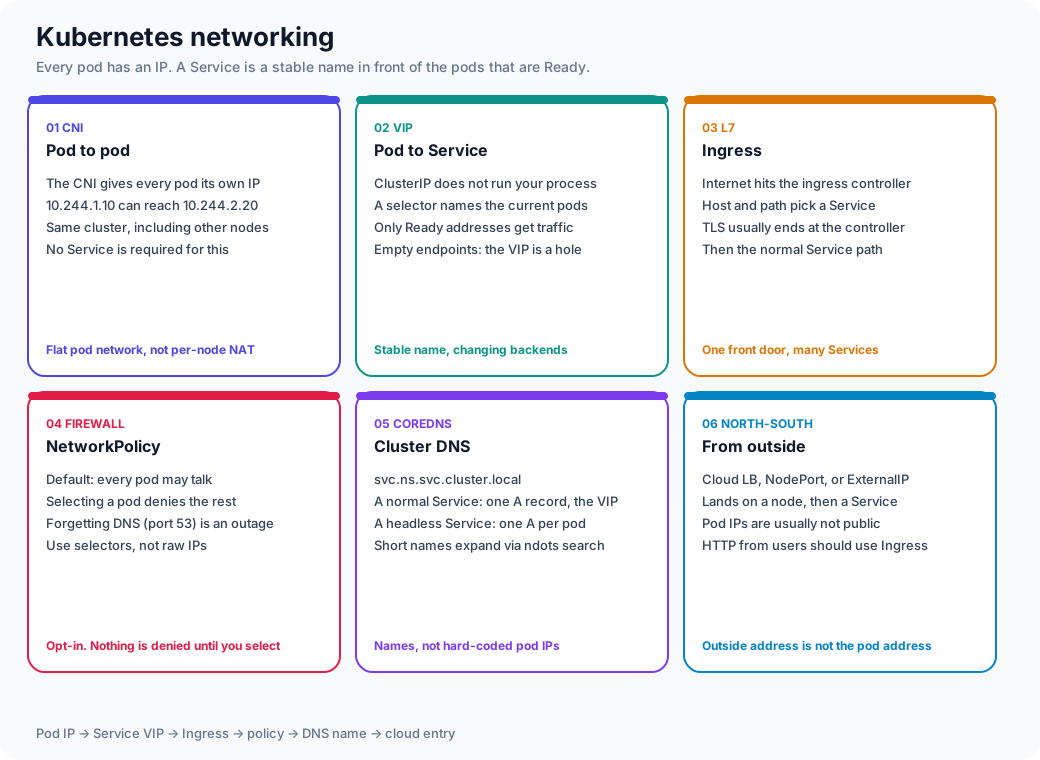
Read the symptom against the panel, not against "Kubernetes networking" as one blob.
- Pod IP to pod IP fails, Service DNS still resolves. CNI or a NetworkPolicy. The Service object is not the broken part.
- The name resolves, curl to the ClusterIP times out. Empty EndpointSlice, or a policy that allows DNS and drops the app port.
- The FQDN works and the short name does not. Search path.
ndots: 5tries severalsvc.cluster.localsuffixes before it treats a name as absolute. - You can open the node and you cannot open the pod IP from your laptop. That is the design. Pod CIDRs are not the public address. HTTP from users goes through Ingress or a cloud load balancer, then a Service.
NetworkPolicy is off until a policy selects the pod. The first rule people forget is egress to CoreDNS on UDP and TCP 53. The error is lookup ... i/o timeout, and the policy object does not mention DNS.
Run it yourself
labs/kubernetes-kind is a real 3-node cluster with a real ingress controller — break a Service selector and watch a stale keepalive connection survive it for a request or two before failing cleanly, or break a readiness probe mid-rollout and watch Kubernetes correctly refuse to finish replacing your working pods with broken ones.
Probes — Three Different Questions
| Probe | Question | Failure action |
|---|---|---|
| Startup | Has the process finished booting? | Disable the other probes until it passes |
| Liveness | Is this process wedged? | Kill and restart the container |
| Readiness | Should it receive traffic right now? | Remove from Endpoints; do not restart |
Production Trap
Liveness that calls the database: when the DB is slow, kubelet kills every pod. You turn a dependency blip into a full restart storm. Liveness = is this process wedged? (local HTTP /live, no Redis/DB). Readiness = can I take traffic? Check a dependency on readiness only if the instance is useless without it — a required payment DB yes; an optional cache no (degrade). Startup = give JVM/migration time so liveness does not murder a slow boot.
kubectl You Will Actually Type
kubectl get pods -o wide
kubectl describe pod $POD          # events at the bottom. Always the bottom.
kubectl logs $POD -c app
kubectl logs $POD --previous       # the crash you just missed
kubectl exec -it $POD -- sh
kubectl get events --sort-by=.lastTimestamp
kubectl top pod
kubectl get endpointslices -l kubernetes.io/service-name=$SVC
kubectl get svc,ing,ep -o wide
describe > dashboards when the object never became Ready. Events are the API server's diary: FailedScheduling, FailedMount, Unhealthy, Killing, Pulled.
How a Pod Finds a Node
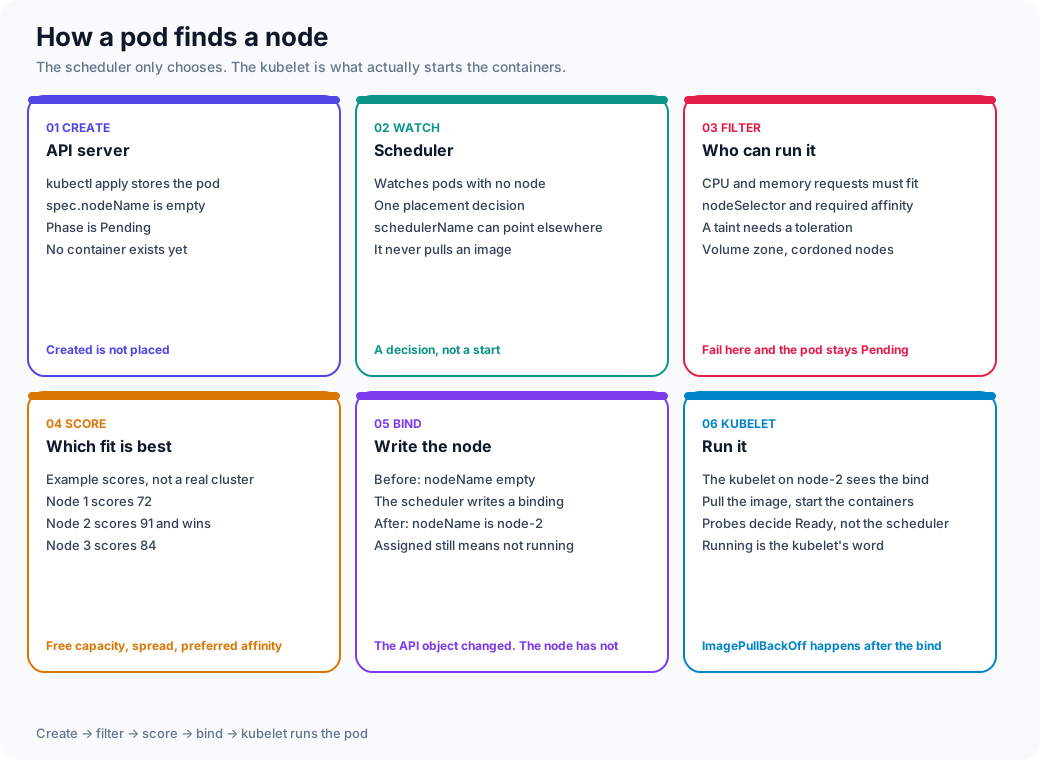
kubectl apply stores a pod with an empty spec.nodeName. Phase is Pending. Nothing is running.
- Filter. Nodes that cannot take the pod are out: requests larger than allocatable CPU or memory,
nodeSelector, required affinity, a taint with no toleration, a cordoned node, a volume that cannot attach in that zone. - Score. The survivors are ranked. Remaining capacity, topology spread, and preferred affinity are the usual reasons. A required rule that matches nobody never reaches this step.
- Bind. The scheduler writes the node name. Assigned is not Running.
- Kubelet. The kubelet on that node pulls the image, starts the containers, and runs probes.
Readyis a probe result. The scheduler does not know if your process listens.
| Event | Stage | What it means |
|---|---|---|
FailedScheduling | Filter | No node fit. Read the line. It names the predicate. |
Scheduled | Bind | nodeName is set. Placement succeeded. |
Pulling, ImagePullBackOff | Kubelet | The node was chosen. The registry or the tag was not. |
Started, then Unhealthy | Kubelet | The container is up. A probe is failing. |
spec.schedulerName points at a custom scheduler. If that controller is down, the pod stays Pending and the default scheduler logs nothing, because it is not watching that pod.
Guided Diagnosis
Work top-down: schedule → pull → start → live → ready → route → serve. The picture above is the first three of those words.
Pending
- Look:
describe pod→FailedScheduling. - Causes: requests bigger than any node; taints; missing PVC; affinity;
Insufficient cpu/memory. - Move:
kubectl describe nodes | grep -A5 Allocated; shrink requests or add nodes. Do not "just remove requests."
ImagePullBackOff
- Look: events:
401 Unauthorized,not found,tls. - Causes: wrong tag, private registry without
imagePullSecrets, rate limit (Docker Hub). - Move: pull the exact image from a node; fix the secret; pin digest not
:latest.
CrashLoopBackOff
- Look:
logs --previous,describerestart count, exit code. - Causes: bad config, missing secret, crash on boot, liveness too aggressive.
- Exit 137 often OOM; exit 1 is the app. Backoff is exponential — waiting is not a fix.
OOMKilled
- Look:
Last State: Reason: OOMKilled,kubectl top, container limit. - Causes: limit too low; leak; one request materializes a huge JSON.
- Move: raise limit and find the allocation. A higher limit without a request change can still evict neighbors.
Failed readiness probe
- Look: pod
Runningbut0/1 Ready; Endpoints empty. - Causes: app still warming, wrong port/path, dependency down (if you wired it that way).
- Move:
kubectl get ep; curl the probe from inside the pod. Users see 502; you see a green Deployment if minReadySeconds/replicas are sloppy.
DNS failure (in-cluster)
- Look:
nslookup kubernetes.defaultfrom the pod; CoreDNS logs;ndotssearch path. - Causes: CoreDNS down, network policy, using
http://svcwithout namespace, Alpine musl + search domains. - Move: FQDN
svc.ns.svc.cluster.local; checkkube-dnsendpoints.
Unreachable Service
- Look: ClusterIP exists,
get endpointsempty or endpoints exist but packets drop. - Causes: selector labels ≠ pod labels (the classic typo); readiness; NetworkPolicy; kube-proxy / CNI bug.
- Move: diff labels.
kubectl get pod --show-labelsvsspec.selector.
Ingress failure
- Look: controller logs, Ingress
address, HTTP 404 from nginx vs 502. - Causes: wrong Service name/port (
servicePortvs named port), no TLS secret, controller not watching the namespace, pathPrefixvsExact. - Move: curl the controller pod directly; bypass DNS.
Where TLS terminates decides more than certificates. Terminate at the Ingress/Gateway and the connection from there to the Pod is plain HTTP by default — fine for most apps, wrong if you need mTLS all the way to the container (compliance, zero-trust) or if a downstream service trusts X-Forwarded-For/X-Real-IP without validating it came from a trusted proxy (that header is attacker-controlled if anything upstream of your edge doesn't strip and re-set it). Also check body-size and timeout defaults at the termination point — a Pod that accepts 50 MB uploads behind an Ingress controller defaulting to a 1 MB body limit fails with a controller-generated 413 that never reaches your app's logs.
High CPU
- Look:
kubectl top pod, CPU throttle (container_cpu_cfs_throttled_seconds). - Causes: limit too tight (throttle looks like "mystery latency"), real hot loop, HPA not firing (wrong metric).
- Move: throttle stats first; then profiles. HPA on CPU when you are I/O bound will not save you.
Memory pressure (node)
- Look: node condition
MemoryPressure, evicted pods,describe node. - Causes: sum of working sets > allocatable; cache; one burstable hog.
- Move: requests that match reality; PriorityClass for critical daemon; don't run CI on the same nodes as checkout.
Storage — Don't Treat Stateful Like Stateless
A Pod's local filesystem dies with the Pod. For anything that needs to survive a reschedule, three objects do the work:
| Object | What it is | The mistake |
|---|---|---|
| PersistentVolume (PV) | The actual storage — a cloud disk, NFS export, etc. Cluster-scoped. | Treating it as tied to one node when it isn't (or is, depending on access mode) |
| PersistentVolumeClaim (PVC) | A Pod's request for storage — size, access mode, StorageClass. Namespace-scoped. | Deleting a PVC assuming it deletes the underlying data — depends on the StorageClass's reclaim policy (Delete vs Retain) |
| StorageClass | The provisioner template (gp3, pd-ssd, etc.) — what kind of disk a PVC actually gets. | Not setting one → falls back to a cluster default that may be the wrong performance tier for a database workload |
Access modes matter more than the name suggests:
ReadWriteOnce(RWO) — one node at a time. This is the default for block storage (EBS, PD). A StatefulSet pod that gets rescheduled to a new node has to wait for the volume to detach from the old node first — that's a real, sometimes multi-minute, availability gap.ReadWriteMany(RWX) — many nodes concurrently (NFS, EFS, Filestore). Needed for genuinely shared state; usually slower than block storage for random I/O.ReadOnlyMany(ROX) — many nodes, read-only. Good fit for shared config/reference data.
Volume expansion (allowVolumeExpansion: true on the StorageClass) lets you grow a PVC without recreating it — but the filesystem still needs an online resize (usually automatic on modern CSI drivers, but confirm for your provisioner) and expansion is one-directional; you can't shrink.
The actual mistake
Running a database as a plain Deployment instead of a StatefulSet. A Deployment's Pods are interchangeable and get random names/IPs on reschedule — fine for stateless replicas, actively dangerous for anything that needs a stable identity (db-0, db-1) to reattach to its own PVC. Use StatefulSet for anything where "which specific replica" matters.
RBAC & Service Accounts
Every Pod runs as a ServiceAccount, and every ServiceAccount not explicitly configured runs as default in its namespace — which historically had broad-enough permissions in many clusters to be a real lateral-movement path if that Pod is compromised.
The least-privilege pattern:
- Create a dedicated ServiceAccount per workload, not a shared one.
- Grant a
Role(namespace-scoped) orClusterRole(cluster-scoped) with only the verbs/resources that workload actually needs —get/list/watchon its own ConfigMaps, not*on everything. - Bind them with a
RoleBinding(orClusterRoleBindingonly when the access genuinely needs to span namespaces). - Set
automountServiceAccountToken: falseon Pods that never call the Kubernetes API at all — most application workloads don't need a token mounted.
What to audit: who can kubectl exec or port-forward into production Pods — those two verbs bypass every network-layer control (NetworkPolicy, Service, Ingress) and reach the container directly. Treat pods/exec RBAC grants with the same scrutiny as SSH access to a prod host, and log them — kubectl exec doesn't show up in application logs at all.
NetworkPolicy
By default, every Pod can talk to every other Pod in the cluster — there's no network isolation until you add a NetworkPolicy. This is genuinely useful for blast-radius containment (a compromised Pod in one namespace can't reach the payments database in another), and genuinely easy to get backwards.
The classic self-inflicted outage
A NetworkPolicy that selects a Pod and specifies Ingress rules implicitly denies all traffic not explicitly allowed — including DNS. Lock down egress on a namespace without an explicit "allow to kube-dns on port 53" rule, and every Pod in that namespace loses the ability to resolve any hostname, including your own Services. The failure looks like a total outage with no useful error beyond dial tcp: lookup ... i/o timeout — nothing in the NetworkPolicy object itself tells you DNS is the cause.
The safe rollout pattern: start with an explicit allow-list — allow DNS egress, allow the specific dependencies a workload calls, allow ingress from the specific namespaces/Pods that call it — and apply it to one namespace at a time with monitoring, rather than a cluster-wide default-deny in one shot.
Realistic Example
Checkout: 3 replicas, readiness GET /ready → 200 after Redis ping. Redis flaps 2s.
- If readiness includes Redis: all 3 pods go unready → Endpoints empty → Ingress 502. You "failed closed" the whole app because a cache blinked.
- If liveness includes Redis: kubelet restarts all 3. Cold JVM + CrashLoop. Worse.
- If readiness is local (
/ready= event loop alive) and Redis failures are handled in-process (degrade, timeout): traffic continues; checkout may be slower or use a fallback. That is usually what you wanted.
Failure Modes (Cluster Level)
| Mode | Symptom | Mitigation |
|---|---|---|
| Rolling update with readiness wrong | New pods Ready immediately, then crash | readinessProbe + minReadySeconds; surge |
| PDB blocks drain | Node upgrade stuck; or you delete PDB and evict checkout | PDB minAvailable vs surge capacity |
| HPA + cluster autoscaler lag | 10 min of 500s before nodes exist | pre-warm, scheduled scaling, queue shedding |
| ConfigMap change not mounted | Pods run old config until bounce | reloader, or hash annotation on pod template |
Production Debugging
Symptom: Ingress 502, Deployment 3/3

1. kubectl get endpointslices -l kubernetes.io/service-name=checkout
   → empty? selector / readiness. not empty? hop is Ingress or CNI.
2. kubectl describe pod | tail
   → Unhealthy, OOMKilled, FailedMount
3. kubectl logs --previous
   → the crash that is no longer the current container
4. From a debug pod: curl checkout:80/ready  and  curl checkout.prod.svc:80
5. kubectl get ing -o yaml   vs  actual Service port name
6. Node: kubectl top node; describe node  (pressure, taints)
The cardinality trap
Adding a pod_name or request_id label to a metric (as opposed to a log field, where it belongs) multiplies your time-series count by every Pod restart and every request. One high-cardinality label on a frequently-emitted metric can silently blow up Prometheus's memory and your storage bill in the same afternoon — it looks like "observability got expensive" long before anyone traces it to one bad label. Keep unbounded/high-cardinality values (IDs, timestamps, freeform strings) in logs and traces; keep metric labels to a small, bounded set (namespace, service, status_code).
Trade-offs
| Choice | Win | Cost |
|---|---|---|
| Many small Deployments | Independent rollout | Mesh, DNS, and on-call surface |
| Tight memory limits | Predictable nodes | OOM on legitimate spikes |
| Deep readiness | Don't take traffic broken | Coupled outages |
| ClusterIP + Ingress | One HTTP front door, many Services | Extra hop, extra timeout to tune |
| NodePort as the public API | Works with no cloud LB | A high port on every node, including ones you did not mean to expose |
| LoadBalancer per Service | A stable external IP | A cloud LB, and a bill, per Service |
| HPA on CPU | Simple | Wrong signal for queue-based apps |
Interview Questions
Q: A Service has a ClusterIP but curl times out. Pods are Running. What do you check?
"Running is not Ready. I check Endpoints — if the list is empty, the Service has nobody to NAT to. That's usually a label selector mismatch or a failing readiness probe. I describe the pod for Unhealthy events, curl the probe path from inside the pod, and only then blame CNI."
Q: How do you roll a Deployment without dropping in-flight requests?
"Readiness must fail as soon as we get SIGTERM (or a preStop that unregisters), then sleep longer than the Ingress/LB deregistration delay, then exit. Termination grace period covers in-flight. PDB keeps minAvailable during the surge. Clients retry only idempotent methods. I load-test the deploy itself — that's when people discover keep-alives still pinned to terminating pods."
Q: Every microservice added a liveness probe that hits its database. What do you do organizationally?
"This is a fleet-wide suicide pact. I'd publish a probe standard: liveness is local and dumb; readiness may be shallow; dependency health is a metric and a SLO, not a kill switch. I'd add a CI policy or admission check for liveness HTTP that points at known data stores, and a tabletop: 'Redis 500ms timeout — do we restart 400 pods?' Then give teams a golden Dockerfile/Helm snippet so the easy path is the safe path. Fixing one YAML is a senior task; changing the default is a staff task."
Key Takeaways
Remember
- The path is Ingress → Service → Endpoints → Pod. Empty Endpoints is the usual ghost outage
Runningis notReady;Readyis not "dependencies are up"- Liveness restarts the process; readiness only removes traffic. Do not ping Redis on liveness. Dependencies on readiness only if the instance is useless without them.
describe+logs --previous+endpointsbeat guessing- Requests schedule; limits kill or throttle — set both on purpose
- NodePort and LoadBalancer keep the ClusterIP. Ingress is not a Service. The scheduler binds a node; the kubelet runs the pod.
Version taught
Version taught / last verified: 2026-09 (request path, Service types, pod networking, scheduling filter/score/bind, probes, PVC/StatefulSet — stable APIs). Current upstream: Kubernetes v1.37 (released 2026-08-26). Compatibility: this page does not depend on 1.37-only features. Service types, empty Endpoints, and the scheduler/kubelet split are unchanged. The NodePort range and score-plugin weights are cluster settings — kubectl explain the cluster in front of you.
Previous: HTTP & TCP | Next: Sagas